
June 12, 2026
Making a marketing dashboard in Power BI is a great move for your business. It brings all your marketing numbers into one simple place. This helps you see what is working and what is wasting your money.
Here is what a Power BI marketing dashboard does:
Many business leaders have a big problem. Their marketing data is spread across five different websites. They have to make reports by hand using spreadsheets. By the time the reports are done, it is too late to make a change.
This delay costs you money. Only 9% of bosses say they know what is driving their sales. Over half of them say bad data stops them from making good choices. This is not a data problem. It is a systems problem.
Power BI fixes this. It replaces messy reports with one live dashboard that your whole team can use.
I am Jose Escalera. I am the CEO of The Idea Farm by VM Digital. I have built marketing systems for many businesses. Often, messy data was their biggest problem. I wrote this guide to show you how to turn messy data into a clean marketing dashboard in Power BI.
As a business leader, you do not need more numbers. You need clear answers. Many companies have too much data. Still, they make big budget choices based on gut feelings.
Sometimes, your marketing team talks about clicks. At the same time, your finance team only talks about profit. This causes a big mix-up. A marketing dashboard power bi system can fix this.
When your marketing and finance bosses work together, your business grows faster. In fact, companies with aligned teams make 20% to 40% more money. To get these gains, both teams must look at the same numbers.
Power BI connects these teams. It links your marketing ads to your actual sales. Your teams will stop arguing about what worked. Instead, they will see how an ad click turned into a real sale.
A custom dashboard lets you do more than just read old reports. You can predict how spending more money on ads will change your profits. If you want to learn how to set up your numbers, read our Data Driven Marketing ROI Guide 2026.
This system puts all your reports in one place. You will not have to rush to make slide decks every week. The dashboard updates on its own. This gives you the facts you need to make fast choices.
Before you open Power BI, you must choose what to measure. If you try to track everything, your dashboard will be too messy. Nobody will use it. Start with the numbers that help your business grow.
Here are the main numbers your dashboard should show:
Your dashboard should separate paid ads from free search traffic (SEO). This lets you compare them. Both are important, but they work in different ways.
Paid ads are fast and cost money. You should track:
SEO is a slow game that brings free traffic. For SEO, you should track:
Showing these side side helps you see if your paid ads are helping your free traffic. It also shows if you are wasting money on ads for search terms you already win for free. To learn how to compare these channels, read our guide on how to Measure Marketing Effectiveness.
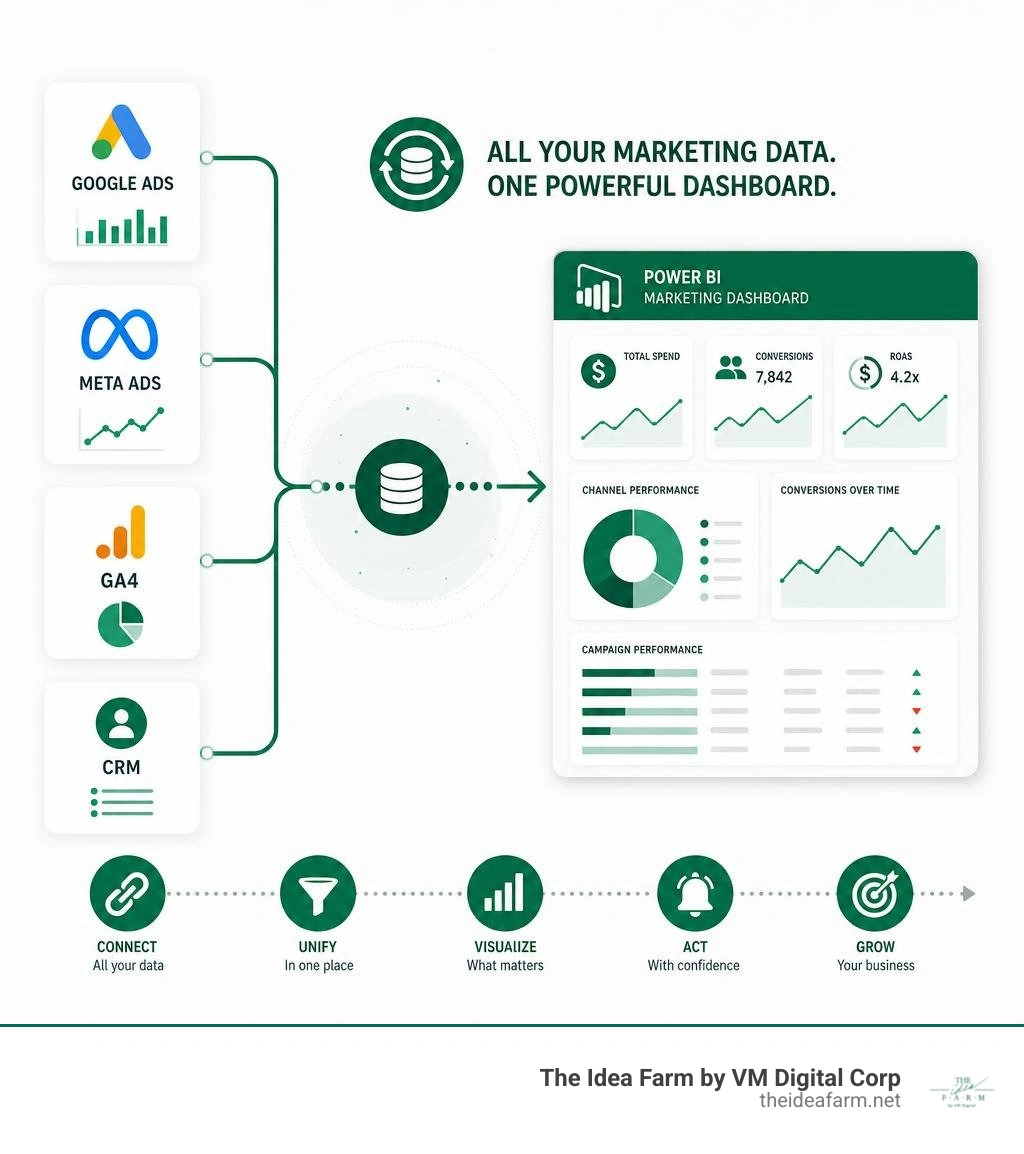
The hardest part for most teams is that their data is split up. Your ads are on Meta and Google. Your website data is in GA4. Your sales data is in HubSpot or Salesforce.
To make a great marketing dashboard power bi system, you must bring all these tools together.

Power BI lets you do this in a few ways:
We suggest using Power Query inside Power BI. Power Query lets you clean your data before you make charts. For example, if Google and Meta use different names for the same campaign, Power Query can combine them.
If you want a step-by-step guide to link these tools, check out this resource on Power BI for marketing: How to set up your dashboards - Supermetrics.
Once you connect your first data source, you can start to Build Custom Dashboards that fit your business.
A great dashboard is not just a group of pretty charts. It is a tool to help you make choices. A boss should look at your dashboard and know how your marketing is doing in five seconds. If they cannot, the design is too hard to read. We call this the "5-second rule."
To keep it clear, keep your designs simple. Do not use every chart type that Power BI has. Focus on clean layouts with lots of empty space.
Use filters so people can change what they see. A boss might want to see only spring sales. An ad manager might want to see only one product. Filters make this easy. You do not have to build many different reports. To see how we design these systems, visit our page on Custom Analytics Dashboards.
When you set up your layout, follow these simple rules:
For ideas on how to design your first report, you can look at the Digital Marketing Dashboard - Fabric Community - Microsoft gallery. Seeing other dashboards can give you great ideas for your own.
Once your basic data is connected and your layout is clean, you can start using Power BI's advanced features to unlock deeper insights.
One of the most powerful tools in Power BI is DAX (Data Analysis Expressions). DAX is a library of formulas that allows you to build custom calculations. Instead of just showing raw spend and revenue, you can write a DAX formula to calculate your exact Campaign ROI in real time:
This simple formula ensures that your ROI updates automatically whenever your ad spend or sales numbers change. You can see a real-world application of these types of calculations in the Shraddha567/Marketing-Campaign-Analysis repository on GitHub.
Another critical feature is the drill-through capability. Drill-through allows a user to click on a high-level metric, like "Total Leads," and jump to a detailed page showing exactly which campaigns and regions generated those leads. This keeps your main dashboard clean while still giving your analysts access to granular data.
Finally, make sure to set up a scheduled data refresh. Marketing moves fast. If your dashboard only updates once a week, you are making decisions based on old news. Setting up an automated daily or hourly refresh ensures you always have the latest numbers. To see how these real-time insights can directly boost your bottom line, read our guide on how to Improve Marketing ROI.
Choosing the right reporting tool depends on your data size and team skills. Here is how the three main options compare:
| Feature | Microsoft Power BI | Google Looker Studio | Microsoft Excel |
|---|---|---|---|
| Data Capacity | Extremely High (Handles millions of rows) | Medium (Can slow down with large datasets) | Low (Struggles with very large files) |
| Data Modeling | Advanced (Power Query & DAX) | Basic | Medium |
| Learning Curve | Steep | Gentle | Moderate |
| Cost | Free Desktop, Paid Cloud Sharing | Free | Included in Office 365 |
| Best For | Complex, multi-source enterprise data | Quick, simple Google-centric reports | Ad-hoc personal analysis |
If you are currently relying on spreadsheets for your tracking, you can learn how to transition by reading our guide on how to Build KPI Dashboard Excel.
You do not have to build your first dashboard from scratch. Microsoft offers several pre-built templates to speed up your setup.
If your business uses Dynamics 365, you can download the official microsoft/Dynamics-365-for-Marketing---Power-BI-Reporting templates. These templates come with pre-built connections for email marketing, lead generation, and customer journey analytics.
For high-level executive reporting, look into Zebra BI templates. They focus on clear, finance-style visuals that make it easy to compare your actual performance against your targets. You can watch this video tutorial on the Power BI Marketing Dashboard Template: Prove ROI with Zebra BI ... to see how to set it up.
The biggest threat to a great dashboard is bad data. If your team does not trust the numbers, they will stop using the tool.
To protect your data quality, establish automated validation rules. For example, if a data source fails to connect, your dashboard should send an alert rather than displaying incomplete charts.
You also need to manage your refresh schedules carefully. If your API limits only allow you to pull data four times a day, schedule those refreshes during off-peak hours so your team always starts their workday with fresh numbers. If you need expertise to help build these complex data pipelines, working with a dedicated growth partner can ensure your systems are set up correctly from the start.
Building a marketing dashboard in Power BI is a journey that moves your business away from guesswork and toward predictable growth. By connecting your tools, defining your core metrics, and designing for clarity, you give your team the power to make fast, confident decisions.
At The Idea Farm, we do not believe in vanity metrics. We are a Fractional Growth Partner. We build connected, data-driven marketing systems that align with your real business goals and financial numbers. We help you connect your marketing spend directly to your bottom-line revenue.
If you are ready to stop guessing and start scaling with a clear view of your numbers, let's build your system together. Explore our framework for sustainable growth by visiting The Growth Dashboard.